How to photograph thrift finds so they sell faster
On resale sites, buyers judge an item almost entirely by its photos. Clear, honest pictures sell items faster and lead to fewer returns. You do not need a studio. A window, a plain background and your phone are enough.
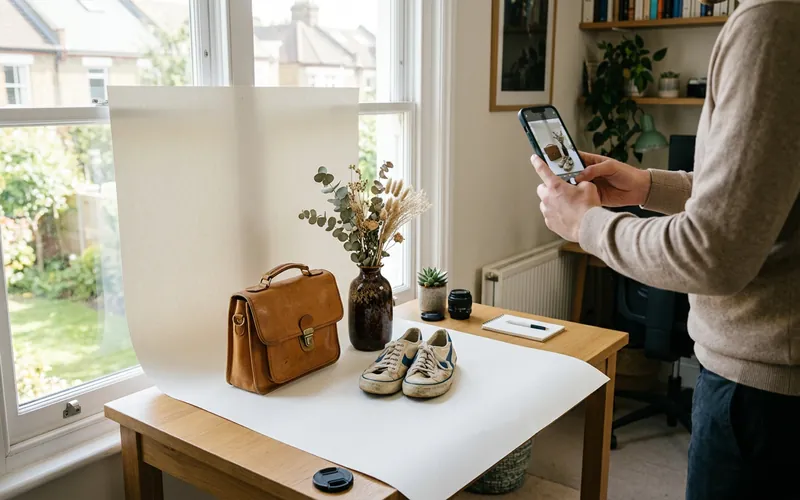
Build a five-minute photo corner
Pick a spot near a large window and keep it ready, so taking photos is quick:
- **Background:** a white or light grey poster board, a plain wall, or a clean sheet. For clothing, a plain door or a mannequin works well.
- **Light:** soft daylight from the side. Avoid direct sun, which makes harsh shadows, and turn off yellow room lights.
- **Bounce card:** a white board on the shadow side brightens dark areas.
- **Steady phone:** a cheap tripod or a stack of books.
Batch your photos. Shooting ten items at once is far faster than one at a time.
The shots buyers want
| Item type | Must-have photos |
|---|---|
| Clothing | Front, back, brand tag, size tag, fabric tag, close-up of fabric, any flaws |
| Shoes | Both sides, top, soles, heels, inside label, box if included |
| Electronics | Front, back, ports, serial or model label, powered on screen |
| Kitchenware and decor | Front, back, bottom marks or stamps, chips or wear |
| Toys and games | All pieces laid out, box condition, instructions if included |
| Tools | Overall, model plate, condition of working parts |
As a rule, take more photos than you think you need. Most platforms allow many images per listing. eBay, for example, allows up to 24 photos on most listings.
Show flaws clearly and honestly
Hiding a stain or a crack leads to returns, bad feedback and "item not as described" claims. Instead:
- Take a wide shot that shows where the flaw is.
- Take a close-up of the flaw itself.
- Mention it in the title or first line of the description.
Honest photos build trust and can actually help sales, because buyers know exactly what they are getting.
Show size and details
- **Measure** clothing flat (pit to pit, length, inseam) and include the numbers in the description.
- For small items, add a **scale photo** next to a coin or ruler.
- Photograph **maker marks, labels and stamps** clearly. They help buyers confirm what an item is, and help your item show up when collectors search.
Editing: light touch only
- Crop so the item fills most of the frame.
- Straighten and brighten so the background looks white, not grey.
- Keep colors true to life.
- Do not use filters that change the color, and never edit out damage.
Many marketplaces also discourage text, borders or watermarks on the main photo. Check each platform's photo rules.
Main photo tips
Your first photo appears in search results, so it matters most:
- Show the whole item, centered, on a clean background.
- For clothing, a flat lay or a hanging shot with the shape smoothed out looks best.
- Make sure it is sharp. Tap to focus before taking the photo.
A quick routine for each item
- Clean or lint-roll the item.
- Main photo on background.
- Back, sides and details.
- Tags, labels and marks.
- Flaws, wide and close.
- Measurements written down.
Good photos plus solid research make listing easy. Next, see how to research resale prices and how to list on eBay.
Frequently asked questions
What is the best background for resale photos?
A plain white or light grey background, or a clean plain wall, so the item stands out and colors look accurate.
How many photos should a resale listing have?
As many as needed to show the whole item, labels and any flaws. Most platforms allow many photos; eBay allows up to 24 on most listings.
Should I show flaws in photos?
Yes. Show a wide shot and a close-up of every flaw and mention it in the description. It prevents returns and builds trust.
Can I use stock photos for used items?
Avoid it. Buyers want to see the actual item they will receive, especially for used goods.